
Google Search Console (GSC) is an essential tool for webmasters, SEOs, and digital marketers. It helps you monitor your site’s performance in Google Search, identify issues, and improve your visibility in the search engine.
 |
| Image Source: https://yoast.com/ |
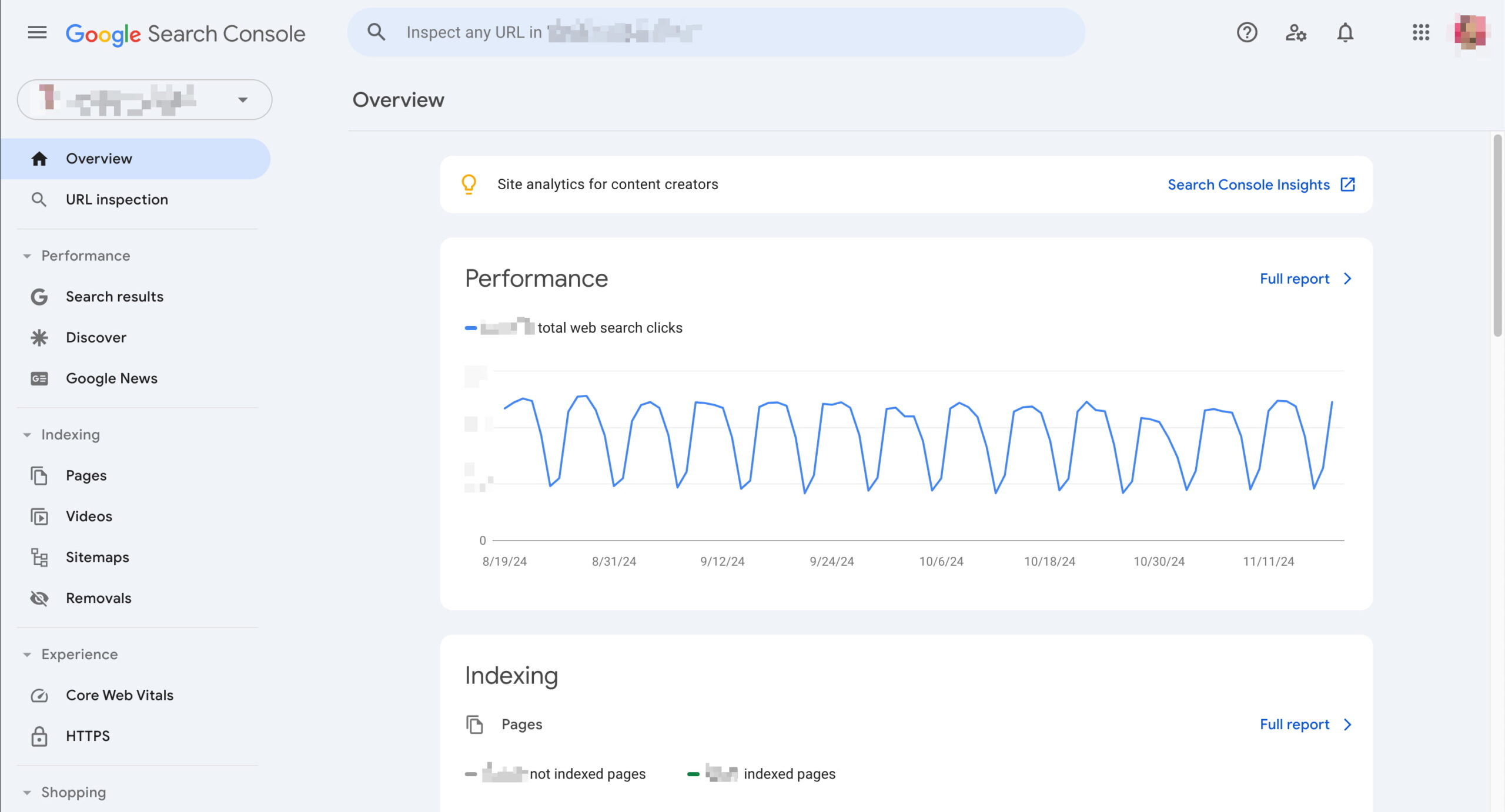
The left-hand menu of GSC is where all the magic begins. Here's a breakdown of every feature and section, explained in a clear and beginner-friendly manner.
Overview
This is the dashboard/homepage of your property in GSC. It gives a quick snapshot of:
-
Total clicks from Google Search
-
Index coverage issues
-
Enhancements (like Core Web Vitals)
-
Mobile usability alerts
Think of it as a summary of your site’s health and performance.
🔹 Performance
Tabs:
-
Search Results
-
Discover
-
Google News (if applicable)
📌 Search Results
Shows how your site performs in Google Search, including:
-
Total clicks
-
Total impressions
-
Average click-through rate (CTR)
-
Average position
You can filter by:
-
Queries (keywords)
-
Pages
-
Countries
-
Devices
-
Search appearance (e.g., rich results)
-
Date range
Use this to identify top-performing pages, declining keywords, and new content opportunities.
Discover
If your site appears in Google Discover, this tab shows clicks and impressions.
📌 Google News
For news publishers, this tab shows how your content performs in Google News.
🔹 URL Inspection
Allows you to check the index status and crawl details of a specific page.
When you enter a URL:
-
It tells you if it’s indexed
-
Shows last crawl date
-
Indicates any canonical tags
-
Highlights structured data issues
-
Lets you request indexing
Use this after publishing new content or fixing issues.
🔹 Index > Pages
This section shows how Google is indexing your pages.
It’s divided into:
-
Indexed: Pages that are successfully indexed
-
Not Indexed: Pages with issues like:
-
404 errors
-
Redirects
-
Noindex tag
-
Crawled but not indexed
Focus on high-value pages that are “Crawled – currently not indexed” or mistakenly marked with noindex.
🔹 Index > Video Pages
Shows indexing details for video content embedded on your site. You’ll see:
-
Indexed video pages
-
Pages with video but not indexed
-
Issues like “Missing video schema” or “Video outside the viewport”
Useful if you publish video content and want visibility in Google Video Search or rich results.
🔹 Index > Sitemaps
This is where you submit your XML sitemap to Google. It helps Google discover your URLs more efficiently.
You can:
-
Submit new sitemaps
-
Check sitemap status
-
See how many pages were discovered from each sitemap
💡 Keep your sitemap clean—don’t include 404s or noindex pages.
🔹 Index > Removals
Allows you to temporarily block URLs from appearing in Google Search.
Three tools here:
-
Temporary removals – Hide pages for ~6 months
-
Outdated content – See requests from users to remove outdated content
-
SafeSearch filtering – See if your pages were flagged as adult content
Use this if sensitive or incorrect content is appearing in search.
🔹 Experience > Page Experience
Evaluates user experience signals, including:
-
Core Web Vitals (LCP, FID/INP, CLS)
-
Mobile usability
-
HTTPS usage
It groups pages into:
-
Good
-
Needs improvement
-
Poor
This affects your rankings indirectly, so aim for “Good” across all signals.
🔹 Experience > Core Web Vitals
Shows detailed performance metrics:
-
LCP (Largest Contentful Paint) – Measures loading speed
-
INP (Interaction to Next Paint) – Measures responsiveness
-
CLS (Cumulative Layout Shift) – Measures visual stability
Google provides URL groups that share similar issues.
🔹 Experience > Mobile Usability
Checks how mobile-friendly your pages are. Errors include:
-
Text too small to read
-
Clickable elements too close
-
Content wider than screen
Most traffic is mobile, so ensure your site passes this test.
🔹 Enhancements
This section covers structured data and schema markup implementations, such as:
📌 Breadcrumbs
Checks if your pages use breadcrumb structured data correctly.
📌 FAQ
Shows if your FAQ schema is valid, and whether rich results are displayed.
📌 Sitelinks Searchbox, Logos, Product schema, and more
Depending on your site type (e.g., e-commerce, local business, blog), other enhancement sections may appear here.
💡 Errors here affect your visibility in rich snippets.
🔹 Security & Manual Actions
📌 Manual Actions
If Google penalizes your site manually (for spam, unnatural links, etc.), it will appear here.
📌 Security Issues
Lists malware, phishing, or other security threats Google has found.
💡 You’ll also get email alerts for these — resolve them ASAP to avoid being deindexed.
🔹 Legacy Tools & Reports
Contains older tools that haven't yet been fully migrated to the new GSC interface. These may include:
-
Crawl stats
-
URL Parameters (deprecated)
-
International targeting (for hreflang)
-
Messages and legacy reports
🔹 Links
Shows how your site is connected internally and externally.
Sections include:
-
Top linked pages externally
-
Top linked pages internally
-
Top linking sites
-
Top linking anchor text
Use this to evaluate your backlink profile and internal linking strategy.
🔹 Settings
Basic property configuration like:
-
Verified ownership
-
User management
-
Change of address tool (if migrating domains)
-
Crawl stats report
-
Crawl rate controls
🔹 Feedback / Support
A small link at the bottom allows you to send feedback to Google or access help articles related to each section of the tool.
✅ Bonus: GSC Tools You Should Use Regularly
| Tool | When to Use |
|---|---|
| URL Inspection | After publishing or updating content |
| Sitemaps | After uploading or modifying your XML sitemap |
| Performance Report | Weekly, to monitor traffic trends and keywords |
| Coverage Report | Monthly, to fix indexing issues |
| Core Web Vitals | Quarterly, to improve site speed and user experience |
| Manual Actions | Immediately when alerted |
| Removals Tool | When removing sensitive or outdated content |
Final Thoughts
The left-hand menu of Google Search Console is your roadmap to understanding how your site is being crawled, indexed, and ranked by Google. Each tool serves a specific purpose — from performance tracking to structured data validation, mobile usability, security issues, and manual penalties.
By regularly exploring and understanding these sections, you can keep your website technically healthy, SEO-optimized, and user-friendly.



 Posts
Posts


No comments:
Post a Comment