
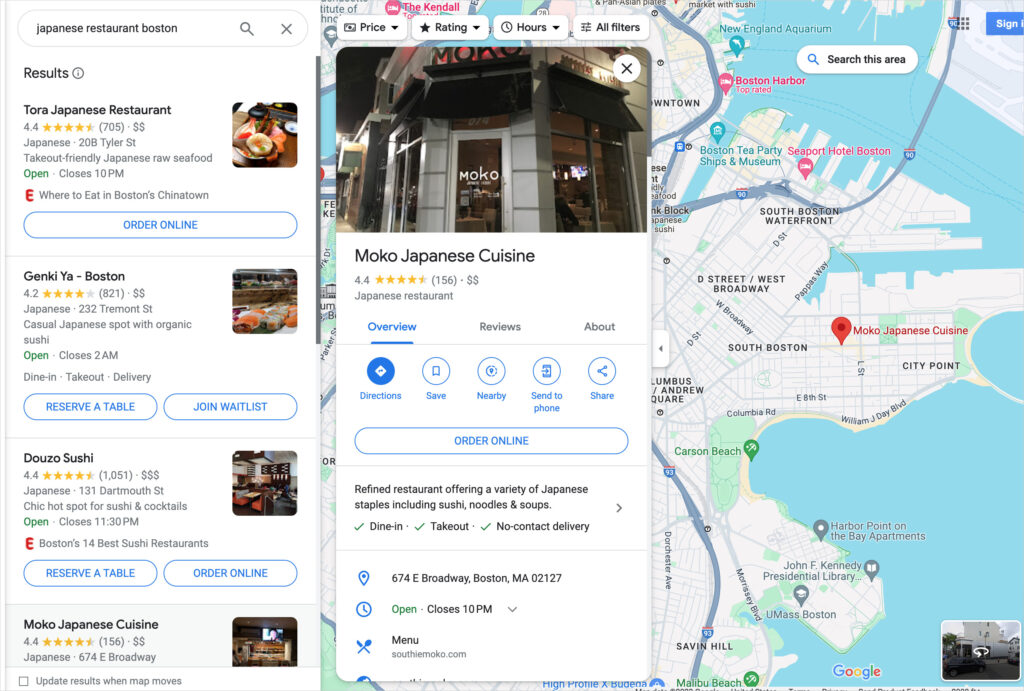
If you run a local business, your Google Business Profile (GBP) ranking can directly impact your foot traffic, phone calls, and website clicks. Appearing in the Google Maps 3-pack or top of the local search results can be the difference between thriving or being invisible.
 |
| Image Source: https://aioseo.com/ |
But how do you actually check where your business ranks on Google?
In this guide, we’ll walk you through:
-
What GBP rankings really mean
-
How proximity impacts local visibility
-
Manual vs. tool-based methods to track rankings
-
Examples using tools like BrightLocal and Local Falcon
-
Best practices for ongoing monitoring and optimization
🧭 What Does “Ranking” Mean in Google Business Profile?
When someone searches a term like:
-
“plumber near me”
-
“furniture store in Braybrook”
-
“best cafe open now”
Google shows local map results (also called the Local Pack or Map Pack) powered by Google Business Profiles.
Your GBP ranking refers to your position in these map-based results for specific keywords, at specific physical locations.
Important: GBP rankings are location-dependent
Unlike traditional SEO, your local ranking changes based on where the searcher is located — even within the same city or suburb.
For example:
A bakery in Parramatta might rank #1 when searched from 100 meters away, but not show up at all from 5 kilometers out.
This is why checking rankings from multiple points across your service area is critical.
📍 1. Manual Methods: Quick Checks
✅ Use Incognito Browser + Localized Keywords
Search for your business manually in Google’s incognito mode using location-rich keywords:
-
“Electrician in Ashfield”
-
“Best Thai restaurant near Bankstown”
Then:
-
See if your business shows in the 3-pack
-
Click “More places” to view extended map listings
Tip: Try different keyword variations, including service + location, business type + near me, etc.
✅ Simulate Location with Google Ads Preview Tool
Use Google’s Ad Preview Tool to simulate searches from specific postcodes or cities:
-
Select device type (mobile or desktop)
-
Choose the language and location
-
Enter your target keyword
This helps simulate what a customer in that exact area would see.
⚠️ Limitations of Manual Checks
-
Your IP, search history, and location permissions can skew results
-
Rankings may vary within just a few blocks
-
It’s not scalable for multi-location businesses or keyword tracking
📊 2. Use Local Rank Tracking Tools (Highly Recommended)
To get precise, geo-targeted GBP rankings, especially across service areas, use local SEO tools that simulate real-user searches at multiple geographic points.
These tools can track rankings by:
-
Keyword
-
Exact coordinates or grid
-
Radius (e.g., 5km around your business)
-
Frequency (daily, weekly, monthly)
🧰 Best Tools for GBP Ranking Checks
1. BrightLocal – Local Search Grid
BrightLocal allows you to:
-
Create a map grid of 5×5, 10×10, or custom-sized grids
-
See exactly where your listing ranks at each location
-
Compare rankings over time
-
Track multiple keywords
Example:
A dentist in Melbourne tracks the keyword “emergency dentist Melbourne” across a 10 km radius using a 7×7 grid. The map shows they rank #1 in their suburb but fall to #7 in the outer grid — helping them focus on outreach and local citations in underperforming zones.
🔗 brightlocal.com
2. Local Falcon – Grid-Based GBP Rank Checker
Local Falcon offers:
-
Hyperlocal GBP ranking tracking
-
Custom zoom-level and grid setup
-
Easy visualization of ranking changes
-
Integration with GBP API
Use Case:
A cleaning service business tracks “house cleaning near me” across Sydney using a 10x10 grid. They discover their visibility is strong near their HQ but nonexistent in the Inner West. They start building Google posts and local pages targeting those areas.
🔗 localfalcon.com
3. Whitespark Local Rank Tracker
Whitespark focuses on:
-
Ranking tracking across both Map Pack and Organic results
-
Keywords vs. locations matrix
-
Competitor comparison
Ideal if you want to combine local and traditional SEO tracking.
🔗 whitespark.ca
4. PlePer Local Tools (Free Chrome Extension)
Useful for lightweight simulation of local search:
-
Fake your location within Google Maps
-
Check GBP presence for different keywords
-
Good for quick spot-checks or competitor analysis
🔗 pleper.com
3. Check GBP Performance in Google’s Native Dashboard
Log into your Google Business Profile Manager and review the “Performance” tab.
While it doesn’t show rankings per se, you can see:
-
Top search terms your listing appears for
-
Number of times your profile was viewed
-
Direction requests, website clicks, and phone calls
Use this to complement your rank tracking tools and observe which keywords are driving the most visibility.
Example: How A Business Tracks GBP Rankings in Multiple Locations
Let’s say A Business has GBP listings in:
-
Braybrook
-
Campbellfield
-
Wetherill Park
-
Ravenhall
To track visibility for each location:
-
Use BrightLocal to create a 10x10 grid around each store
-
Track keywords like “luxury furniture Braybrook” or “mirror store Wetherill Park”
-
Set weekly rank tracking for top local search queries
-
Cross-check performance insights in GBP dashboard (calls, direction requests)
-
Use data to update Google Posts, Q&A, and respond to reviews in weaker areas
📋 Tips for Ongoing GBP Ranking Optimization
-
Keep NAP consistent across citations and directories
-
Regularly post to your GBP (offers, events, product updates)
-
Collect and respond to reviews promptly
-
Add local keywords to your description and services
-
Use UTM parameters on website links to track GBP traffic in Google Analytics
-
Optimize images with EXIF geotags and local filenames (optional but helpful)
🧠 Final Thoughts
Google Business Profile visibility is the lifeblood of local SEO. Checking your rankings manually can help in a pinch, but using structured tools like BrightLocal or Local Falcon gives you clear, actionable visibility insights.



 Posts
Posts


No comments:
Post a Comment