
Whether you're optimizing your own site or doing client work, a comprehensive website audit is the foundation of any successful digital strategy. It helps uncover hidden issues, boost performance, and identify SEO and UX gaps that could be costing you traffic, rankings, or conversions.
In this article, I’ll walk you through a full website audit plan—step by step—with real-world-style examples and actionable tools.
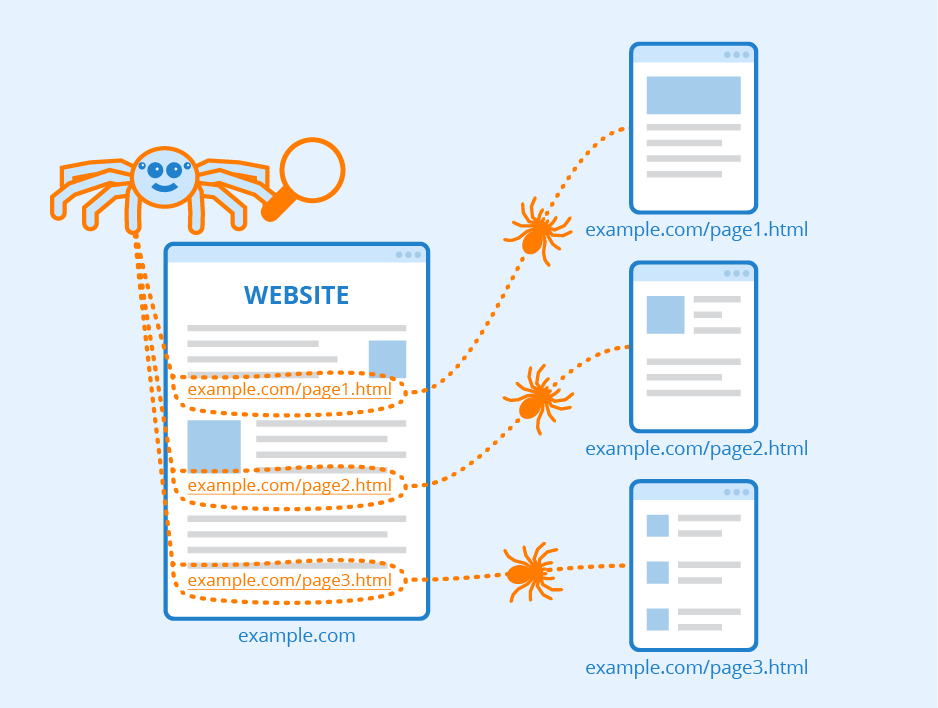 |
| Image Source: https://www.seobility.net/ |
What Is a Website Audit?
A website audit is a structured review of your site’s performance across multiple categories, including:
-
Technical SEO
-
On-page and content quality
-
User experience (UX)
-
Performance and Core Web Vitals
-
Indexing and crawlability
-
Backlink profile and authority
-
Conversion elements and CTAs
Let’s dive into each section of the audit.
1. Technical SEO Audit
A technically sound website is the backbone of good SEO. Even strong content can fail to rank if search engines can’t crawl or index it properly.
What to Check:
-
Crawl errors (404s, broken links)
-
XML sitemap availability and updates
-
Robots.txt status
-
Canonical tags
-
HTTPS and redirect chains
-
Mobile usability
Tools:
-
Google Search Console (Coverage, Pages)
-
Screaming Frog SEO Spider
-
Ahrefs Site Audit or Semrush Site Audit
-
GTmetrix
Example:
Let’s say an eCommerce site is seeing a drop in product page rankings. Screaming Frog reveals 184 broken internal links due to a discontinued category URL that was never redirected. Fixing these with proper 301 redirects can immediately recover crawl equity.
2. Core Web Vitals and Site Speed
Speed matters—especially on mobile. Google uses Core Web Vitals (LCP, INP, CLS) to measure user experience.
What to Check:
-
Page load speed (LCP ≤ 2.5s)
-
Interaction delay (INP ≤ 200ms)
-
Layout shift (CLS ≤ 0.1)
-
Mobile responsiveness
Tools:
-
PageSpeed Insights (pagespeed.web.dev)
-
WebPageTest
-
Lighthouse (in Chrome DevTools)
-
Cloudflare/GTmetrix for performance metrics
Example:
A blog post with embedded YouTube videos had a 4.6s LCP on mobile. By lazy-loading the video and compressing header images, the page speed improved by 42%, leading to better rankings and time on page.
3. Indexing & Crawlability
Just because a page is live doesn’t mean it’s being indexed.
What to Check:
-
Indexed vs. non-indexed pages in Google Search Console
-
Crawl budget waste (duplicate or low-value pages)
-
Noindex or canonical tag issues
-
Redirect chains or infinite loops
Tools:
-
Google Search Console
-
Screaming Frog
-
Ahrefs / Semrush Site Audit
Example:
A B2B SaaS website had over 1,200 URLs marked “Discovered – currently not indexed.” A content audit revealed hundreds of thin FAQ pages. Consolidating them into topic hubs improved crawl efficiency and indexing.
4. On-Page SEO and Content Audit
Now evaluate how well individual pages are optimized and how your content performs.
What to Check:
-
Keyword targeting per page (primary and secondary)
-
Title tag and meta description relevance
-
H1, H2 structure
-
Image ALT text usage
-
Internal linking
-
Content depth and intent match
Tools:
-
Surfer SEO, Frase, or Clearscope for content relevance
-
Google Search Console > Performance > Queries
-
Ahrefs Site Explorer > Top Pages
Example:
A blog titled “Best Protein Powders” ranked on page 3 for “vegan protein supplements.” Updating the article to include a dedicated vegan section, schema markup, and better H2s helped push it to page 1.
5. Content Quality & Engagement
Beyond keywords, evaluate whether your content actually helps the user.
What to Check:
-
Time on page and bounce rate (via GA4)
-
Scroll depth (use Hotjar or Clarity)
-
Duplicate or outdated content
-
Thin content (< 300 words with no clear value)
-
E-E-A-T signals (author bios, expert quotes, sources)
Example:
A travel blog’s destination guides had only basic facts. By adding firsthand experiences, hotel recommendations, and high-quality images, time on page increased by 3× and bounce rate dropped by 28%.
6. UX and Conversion Elements
A site that’s hard to use won’t convert—no matter how much traffic it gets.
What to Check:
-
Clear CTA buttons and forms
-
Mobile-friendly design
-
Readability (font size, spacing, contrast)
-
Navigation and site structure
-
Accessibility (contrast, alt tags, keyboard navigation)
Example:
A local dental clinic’s appointment form was only visible on desktop. After adding a sticky mobile CTA and simplifying the form, conversion rates jumped from 1.2% to 3.4%.
7. Backlink & Authority Review
High-quality backlinks are still one of the most powerful ranking signals.
What to Check:
-
Number of referring domains
-
Domain Rating / Domain Authority
-
Toxic or spammy links
-
Lost backlinks over time
Tools:
-
Ahrefs / Semrush
-
Google Search Console (Links tab)
-
Moz Link Explorer
Example:
An online education site lost 30 high-DA links due to expired guest posts. Reclaiming those by contacting webmasters and updating dead content recovered lost rankings for 8 blog posts.
8. Schema and Structured Data
Schema helps Google understand your content and display rich results.
What to Check:
-
Product, Article, FAQ, HowTo, Review, and Local Business schema
-
Proper use of
@context,@type, and required properties -
Errors or warnings in schema validation
Tools:
-
Schema Markup Validator
-
Rich Results Test
-
Merkle’s Schema Generator
Example:
Adding Product and Review schema to an eCommerce site’s PDPs resulted in visible star ratings in the SERPs—and a 12% higher click-through rate over 30 days.
Final Audit Checklist Summary
| Audit Area | Key Focus |
|---|---|
| Technical SEO | Crawl errors, redirects, indexability |
| Core Web Vitals | Speed, interaction delay, layout stability |
| Content Quality | Keyword relevance, depth, freshness |
| UX/Design | Mobile usability, CTA clarity |
| Backlinks | Referring domains, toxicity, lost links |
| Schema Markup | Structured data presence and accuracy |
| Engagement | Scroll depth, bounce rate, readability |
Final Thoughts
A proper website audit is not just about fixing what’s broken—it’s about uncovering opportunities. From speeding up your site and strengthening your content to improving navigation and conversion paths, each audit step brings you closer to a healthier, more profitable website.
Whether you’re auditing a new site or reviewing your own, treat it as a regular practice—not a one-time project. The web is dynamic. So should be your optimization efforts.



 Posts
Posts


Excellent breakdown of how a comprehensive website audit covers SEO, UX, content, and technical health. From fixing crawl errors to optimizing Core Web Vitals and backlinks, every step matters. Partnering with the best SEO marketing company in Gurgaon (https://www.wildnettechnologies.com/best-seo-marketing-company-in-gurgaon) can ensure these audits turn into actionable strategies that drive real growth and visibility.
ReplyDelete